 *
*
* The Document is a container for text that serves
* as the model for swing text components. The goal for this
* interface is to scale from very simple needs (a plain text textfield)
* to complex needs (an HTML or XML document, for example).
*
*
Content *
* At the simplest level, text can be * modeled as a linear sequence of characters. To support * internationalization, the Swing text model uses * unicode characters. * The sequence of characters displayed in a text component is * generally referred to as the component's content. *
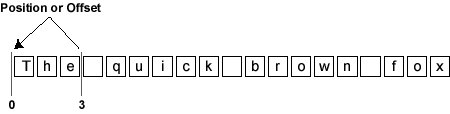
* To refer to locations within the sequence, the coordinates * used are the location between two characters. As the diagram * below shows, a location in a text document can be referred to * as a position, or an offset. This position is zero-based. *
*
* In the example, if the content of a document is the * sequence "The quick brown fox," as shown in the preceding diagram, * the location just before the word "The" is 0, and the location after * the word "The" and before the whitespace that follows it is 3. * The entire sequence of characters in the sequence "The" is called a * range. *
The following methods give access to the character data * that makes up the content. *
Structure *
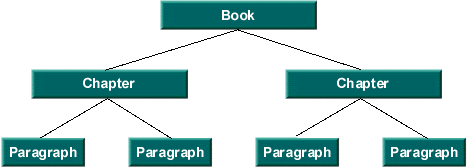
* Text is rarely represented simply as featureless content. Rather, * text typically has some sort of structure associated with it. * Exactly what structure is modeled is up to a particular Document * implementation. It might be as simple as no structure (i.e. a * simple text field), or it might be something like diagram below. *
 *
*
* The unit of structure (i.e. a node of the tree) is referred to * by the Element interface. Each Element * can be tagged with a set of attributes. These attributes * (name/value pairs) are defined by the * AttributeSet interface. *
The following methods give access to the document structure. *
Mutations *
* All documents need to be able to add and remove simple text. * Typically, text is inserted and removed via gestures from * a keyboard or a mouse. What effect the insertion or removal * has upon the document structure is entirely up to the * implementation of the document. *
The following methods are related to mutation of the * document content: *
Notification *
* Mutations to the Document must be communicated to
* interested observers. The notification of change follows the event model
* guidelines that are specified for JavaBeans. In the JavaBeans
* event model, once an event notification is dispatched, all listeners
* must be notified before any further mutations occur to the source
* of the event. Further, order of delivery is not guaranteed.
*
* Notification is provided as two separate events,
* DocumentEvent, and
* UndoableEditEvent.
* If a mutation is made to a Document through its api,
* a DocumentEvent will be sent to all of the registered
* DocumentListeners. If the Document
* implementation supports undo/redo capabilities, an
* UndoableEditEvent will be sent
* to all of the registered UndoableEditListeners.
* If an undoable edit is undone, a DocumentEvent should be
* fired from the Document to indicate it has changed again.
* In this case however, there should be no UndoableEditEvent
* generated since that edit is actually the source of the change
* rather than a mutation to the Document made through its
* api.
*
 *
*
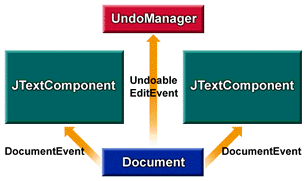
* Referring to the above diagram, suppose that the component shown * on the left mutates the document object represented by the blue * rectangle. The document responds by dispatching a DocumentEvent to * both component views and sends an UndoableEditEvent to the listening * logic, which maintains a history buffer. *
* Now suppose that the component shown on the right mutates the same * document. Again, the document dispatches a DocumentEvent to both * component views and sends an UndoableEditEvent to the listening logic * that is maintaining the history buffer. *
* If the history buffer is then rolled back (i.e. the last UndoableEdit * undone), a DocumentEvent is sent to both views, causing both of them to * reflect the undone mutation to the document (that is, the * removal of the right component's mutation). If the history buffer again * rolls back another change, another DocumentEvent is sent to both views, * causing them to reflect the undone mutation to the document -- that is, * the removal of the left component's mutation. *
* The methods related to observing mutations to the document are: *
Properties *
* Document implementations will generally have some set of properties
* associated with them at runtime. Two well known properties are the
* StreamDescriptionProperty,
* which can be used to describe where the Document came from,
* and the TitleProperty, which can be used to
* name the Document. The methods related to the properties are:
*
Overview and Programming Tips *
{@link javax.swing.text.Element} is an important interface used in constructing a Document. * It has the power to describe various structural parts of a document, * such as paragraphs, lines of text, or even (in HTML documents) items in lists. * Conceptually, the Element interface captures some of the spirit of an SGML document. * So if you know SGML, you may already have some understanding of Swing's Element interface. *
In the Swing text API's document model, the interface Element defines a structural piece of a Document, * like a paragraph, a line of text, or a list item in an HTML document. *
Every Element is either a branch or a leaf. If an element is a branch,
* the isLeaf() method returns false. If an element is a leaf, isLeaf() returns true.
*
Branches can have any number of children. Leaves do not have children.
* To determine how many children a branch has, you can call getElementCount().
* To determine the parent of an Element, you can call getParentElement().
* Root elements don't have parents, so calling getParentElement() on a root returns null.
*
An Element represents a specific region in a Document that begins with startOffset * and ends just before endOffset. * The start offset of a branch Element is usually the start offset of its first child. * Similarly, the end offset of a branch Element is usually the end offset of its last child. *
Every Element is associated with an AttributeSet that you can access by calling getAttributes().
* In an Element, and AttributeSet is essentially a set of key/value pairs.
* These pairs are generally used for markup -- such as determining the Element's
* foreground color, font size, and so on. But it is up to the model, and the developer,
* to determine what is stored in the AttributeSet.
*
You can obtain the root Element (or Elements) of a Document by calling the
* methods getDefaultRootElement() and getRootElements(), which are defined in the Document interface.
*
The Document interface is responsible for translating a linear view of the * characters into Element operations. It is up to each Document implementation * to define what the Element structure is. * *
The PlainDocument class *
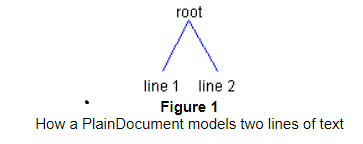
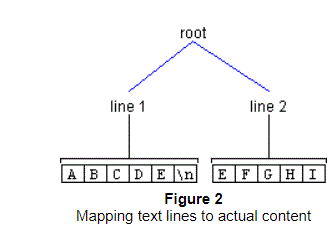
The {@link javax.swing.text.PlainDocument} class defines an Element * structure in which the root node has a child node for each line of text in the model. * Figure 1 shows how two lines of text would be modeled by a PlainDocument *
 *
*
Figure 2 shows how how those same two lines of text might map to actual content: *
 *
*
*
*
Inserting text into a PlainDocument *
As just mentioned, a PlainDocument contains a root Element, which in turn
* contains an Element for each line of text.
* When text is inserted into a PlainDocument, it creates the Elements that
* are needed for an Element to exist for each newline.
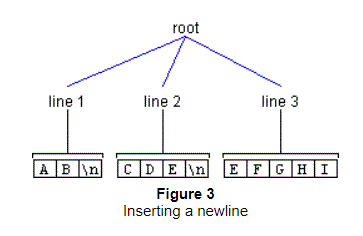
* To illustrate, let's say you wanted to insert a newline at offset 2 in Figure 2, above.
* To accomplish this objective, you could use the Document method insertString(),
* using this syntax:
*
document.insertString(2, "\n", null);After invoking the insertString() method, the Element structure would look
* like the one shown in Figure 3.
*
 *
*
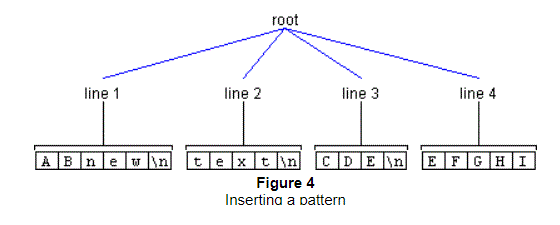
As another example, let's say you wanted to insert the pattern "new\ntext\n" * at offset 2 as shown previously in Figure 2. This operation would have the * result shown in Figure 4. *
 *
*
In the preceding illustrations, the name of the line Elements is changed * after the insertion to match the line numbers. * But notice that when this is done, the AttributeSets remain the same. * For example, in Figure 2, the AttributeSet of Line 2 matches that of the * AttributeSet of Line 4 in Figure 4. * *
Removing text from a PlainDocument *
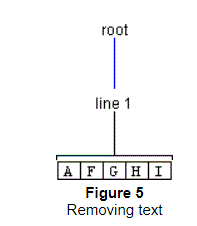
Removal of text results in a structure change if the deletion spans more than one line. * Consider a deletion of seven characters starting at Offset 1 shown previously in Figure 3. * In this case, the Element representing Line 2 is completely removed, as the * region it represents is contained in the deleted region. * The Elements representing Lines 1 and 3 are joined, as they are partially * contained in the deleted region. Thus, we have the result: *
 *
*
*
*
The Default StyledDocument Class *
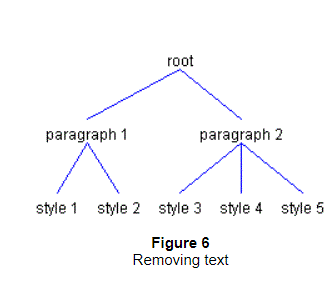
The {@link javax.swing.text.DefaultStyledDocument} class, used for styled text, * contains another level of Elements. * This extra level is needed so that each paragraph can contain different styles of text. * In the two paragraphs shown in Figure 6, the first paragraph contains * two styles and the second paragraph contains three styles. *
 *
*
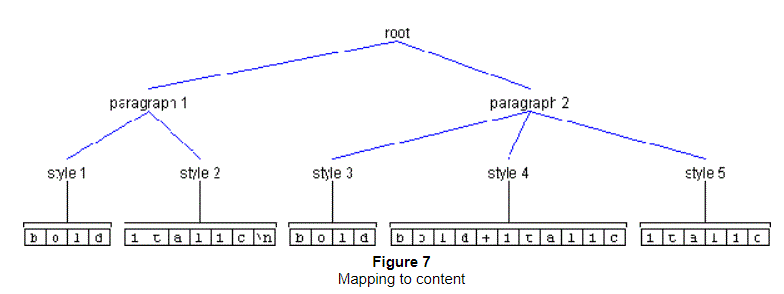
Figure 7 shows how those same Elements might map to content. *
 *
*
*
*
Inserting text into a DefaultStyledDocument *
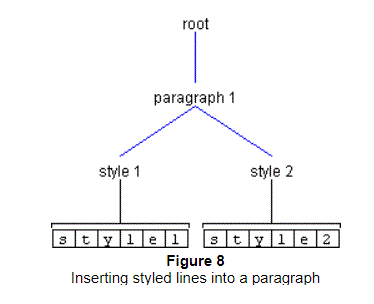
As previously mentioned, DefaultStyledDocument maintains an Element structure * such that the root Element * contains a child Element for each paragraph. In turn, each of these * paragraph Elements contains an Element for each style of text in the paragraph. * As an example, let's say you had a document containing one paragraph, * and that this paragraph contained two styles, as shown in Figure 8. *
 *
*
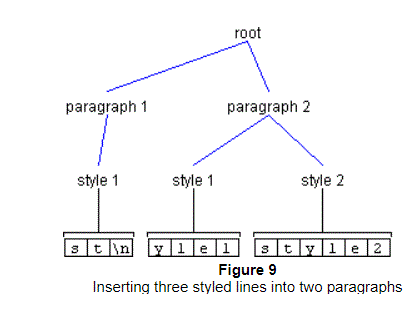
If you then wanted to insert a newline at offset 2, you would again use the
* method insertString(), as follows:
*
*
 styledDocument.insertString(2, "\n",
styledDocument.getCharacterElement(0).getAttributes());This operation would have the result shown in Figure 9. *
 *
*
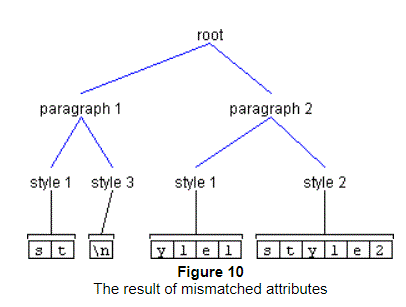
It's important to note that the AttributeSet passed to insertString() matches
* that of the attributes of Style 1. If the AttributeSet passed to insertString()
* did not match, the result would be the situation shown in Figure 10.
*
 *
*
Removing text from a DefaultStyledDocument *
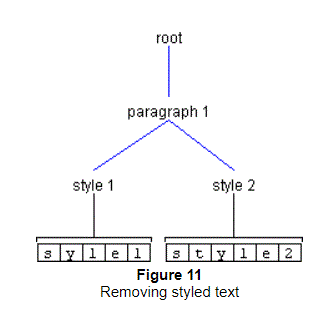
Removing text from a DefaultStyledDocument is similar to removing text from * a PlainDocument. The only difference is the extra level of Elements. * Consider what would happen if you deleted two characters at Offset 1 * from Figure 10, above. Since the second Element of Paragraph 1 is * completely contained in the deleted region, it would be removed. * Assuming the attributes of Paragraph 1's first child matched those of * Paragraph2's first child, the results would be those shown in Figure 11. *
 *
*
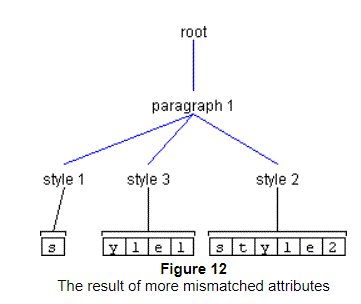
If the attributes did not match, we would get the results shown in Figure 12. *
 *
*
*
*
The StyledDocument Class *
The {@link javax.swing.text.StyledDocument} class provides a method
* named setCharacterAttributes(), which allows you to set the attributes
* on the character Elements in a given range:
*
 public void setCharacterAttributes
* (int offset, int length, AttributeSet s, boolean replace);Recall that in the diagrams shown in the previous section, all leaf Elements
* shown in the drawings were also character Elements.
* That means that the setCharacterAttributes() method could be used to set their attributes.
*
The setCharacterAttributes() method takes four arguments .
* The first and second arguments identify a region in the Document that is
* to be changed. The third argument specifies the new attributes
* (as an AttributeSet), and the fourth argument determines if the new attributes
* should be added to the existing attributes (a value of false) or
* if the character Element should replace its existing attributes
* with the new attributes (a value of true).
*
As an example, let's say you wanted to change the attributes of the
* first three characters in Figure 9, shown previously.
* The first two arguments passed to setCharacterAttributes() would be 0 and 3.
* The third argument would be the AttributeSet containing the new attributes.
* In the example we are considering, it doesn't matter what the fourth argument is.
*
As the start and end offsets of the changed region (0 and 3) fall on * character Element boundaries, no structure change is needed. * That is, only the attributes of the character Element style 1 will change. *
Now let's look at an example that requires a structure change.
* Instead of changing the first three characters shown in Figure 9,
* let's change the first two characters.
* Because the end change offset (2) does not fall on a character Element boundary,
* the Element at offset 2 must be split in such a way
* that offset 2 is the boundary of two Elements.
* Invoking setCharacterAttributes() with a start offset of 0
* and length of 2 has the result shown earlier in Figure 10.
*
Changing Paragraph Attributes in a StyledDocument *
The StyledDocument class provides a method named setParagraphAttributes(),
* which can be used to change the attributes of a paragraph Element:
*
 public void setParagraphAttributes
* (int offset, int length, AttributeSet s, boolean replace);This method is similar to setCharacterAttributes(),
* but it allows you to change the attributes of paragraph Elements.
* It is up to the implementation of a StyledDocument to define which Elements
* are paragraphs. DefaultStyledDocument interprets paragraph Elements
* to be the parent Element of the character Element.
* Invoking this method does not result in a structure change;
* only the attributes of the paragraph Element change.
*
*
It is recommended to look into {@link javax.swing.text.EditorKit} and
* {@link javax.swing.text.View}.
* View is responsible for rendering a particular Element, and
* EditorKit is responsible for a ViewFactory that is able to decide what
* View should be created based on an Element.
*
* @author Timothy Prinzing
*
* @see javax.swing.event.DocumentEvent
* @see javax.swing.event.DocumentListener
* @see javax.swing.event.UndoableEditEvent
* @see javax.swing.event.UndoableEditListener
* @see Element
* @see Position
* @see AttributeSet
*/
public interface Document {
/**
* Returns number of characters of content currently
* in the document.
*
* @return number of characters >= 0
*/
public int getLength();
/**
* Registers the given observer to begin receiving notifications
* when changes are made to the document.
*
* @param listener the observer to register
* @see Document#removeDocumentListener
*/
public void addDocumentListener(DocumentListener listener);
/**
* Unregisters the given observer from the notification list
* so it will no longer receive change updates.
*
* @param listener the observer to register
* @see Document#addDocumentListener
*/
public void removeDocumentListener(DocumentListener listener);
/**
* Registers the given observer to begin receiving notifications
* when undoable edits are made to the document.
*
* @param listener the observer to register
* @see javax.swing.event.UndoableEditEvent
*/
public void addUndoableEditListener(UndoableEditListener listener);
/**
* Unregisters the given observer from the notification list
* so it will no longer receive updates.
*
* @param listener the observer to register
* @see javax.swing.event.UndoableEditEvent
*/
public void removeUndoableEditListener(UndoableEditListener listener);
/**
* Gets the properties associated with the document.
*
* @param key a non-null property key
* @return the properties
* @see #putProperty(Object, Object)
*/
public Object getProperty(Object key);
/**
* Associates a property with the document. Two standard
* property keys provided are:
* StreamDescriptionProperty and
* TitleProperty.
* Other properties, such as author, may also be defined.
*
* @param key the non-null property key
* @param value the property value
* @see #getProperty(Object)
*/
public void putProperty(Object key, Object value);
/**
* Removes a portion of the content of the document.
* This will cause a {@code DocumentEvent} of type
* {@code DocumentEvent.EventType.REMOVE} to be sent to the
* registered {@code DocumentListener}s, unless an exception
* is thrown. The notification will be sent to the
* listeners by calling the {@code removeUpdate} method on the
* {@code DocumentListener}.
*
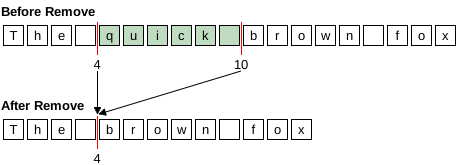
* To ensure reasonable behavior in the face * of concurrency, the event is dispatched after the * mutation has occurred. This means that by the time a * notification of removal is dispatched, the document * has already been updated and any marks created by * {@code createPosition} have already changed. * For a removal, the end of the removal range is collapsed * down to the start of the range, and any marks in the removal * range are collapsed down to the start of the range. *
* For example, if the document contains the text * ‘The quick brown fox’, * calling {@code remove(4, 6)} will remove the word * ‘quick’ and the following space from the text, * and all the marks in the range 4–10 will be collapsed to 4. *
 *
*
* If the document structure changed as result of the removal, * the details of what {@code Element}s were inserted and removed in * response to the change will also be contained in the generated * {@code DocumentEvent}. It is up to the implementation of a {@code Document} * to decide how the structure should change in response to a * remove. *
* If the {@code Document} supports undo/redo, an {@code UndoableEditEvent} will * also be generated. * * @param offs the offset from the beginning >= 0 * @param len the number of characters to remove >= 0 * @throws BadLocationException some portion of the removal range * was not a valid part of the document. The location in the exception * is the first bad position encountered. * @see javax.swing.event.DocumentEvent * @see javax.swing.event.DocumentListener * @see javax.swing.event.UndoableEditEvent * @see javax.swing.event.UndoableEditListener */ public void remove(int offs, int len) throws BadLocationException; /** * Inserts a string of content. This will cause a {@code DocumentEvent} * of type {@code DocumentEvent.EventType.INSERT} to be sent to the * registered {@code DocumentListener}s, unless an exception is thrown. * The {@code DocumentEvent} will be delivered by calling the * {@code insertUpdate} method on the {@code DocumentListener}. * The offset and length of the generated {@code DocumentEvent} * will indicate what change was actually made to the {@code Document}. *
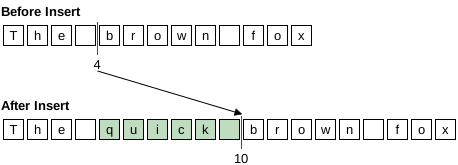
* For example, if the document contains the text * ‘The brown fox’, * calling {@code insert(4, "quick ", null)} will insert the word * ‘quick’ and the following space into the text, * and all the marks at 4 and above will be moved by 6 (the number * of inserted characters). *
 *
*
* If the {@code Document} structure changed as result of the insertion, * the details of what {@code Element}s were inserted and removed in * response to the change will also be contained in the generated * {@code DocumentEvent}. It is up to the implementation of a {@code Document} * to decide how the structure should change in response to an * insertion. *
* If the {@code Document} supports undo/redo, an {@code UndoableEditEvent} will * also be generated. * * @param offset the offset into the document to insert the content >= 0. * All positions that track change at or after the given location * will move. * @param str the string to insert * @param a the attributes to associate with the inserted * content. This may be {@code null} if there are no attributes. * @throws BadLocationException the given insert position is not a valid * position within the document * @see javax.swing.event.DocumentEvent * @see javax.swing.event.DocumentListener * @see javax.swing.event.UndoableEditEvent * @see javax.swing.event.UndoableEditListener */ public void insertString(int offset, String str, AttributeSet a) throws BadLocationException; /** * Fetches the text contained within the given portion * of the document. * * @param offset the offset into the document representing the desired * start of the text >= 0 * @param length the length of the desired string >= 0 * @return the text, in a String of length >= 0 * @throws BadLocationException some portion of the given range * was not a valid part of the document. The location in the exception * is the first bad position encountered. */ public String getText(int offset, int length) throws BadLocationException; /** * Fetches the text contained within the given portion * of the document. *
* If the partialReturn property on the txt parameter is false, the * data returned in the Segment will be the entire length requested and * may or may not be a copy depending upon how the data was stored. * If the partialReturn property is true, only the amount of text that * can be returned without creating a copy is returned. Using partial * returns will give better performance for situations where large * parts of the document are being scanned. The following is an example * of using the partial return to access the entire document: * *
     *
     *   int nleft = doc.getDocumentLength();
     *   Segment text = new Segment();
     *   int offs = 0;
     *   text.setPartialReturn(true);
     *   while (nleft > 0) {
     *       doc.getText(offs, nleft, text);
     *       // do something with text
     *       nleft -= text.count;
     *       offs += text.count;
     *   }
     *
     *
* Typically there will be only one document structure, but the interface * supports building an arbitrary number of structural projections over the * text data. The document can have multiple root elements to support * multiple document structures. Some examples might be: *
*Runnable used to render the model
*/
public void render(Runnable r);
/**
* The property name for the description of the stream
* used to initialize the document. This should be used
* if the document was initialized from a stream and
* anything is known about the stream.
*/
public static final String StreamDescriptionProperty = "stream";
/**
* The property name for the title of the document, if
* there is one.
*/
public static final String TitleProperty = "title";
}